Tag: Card

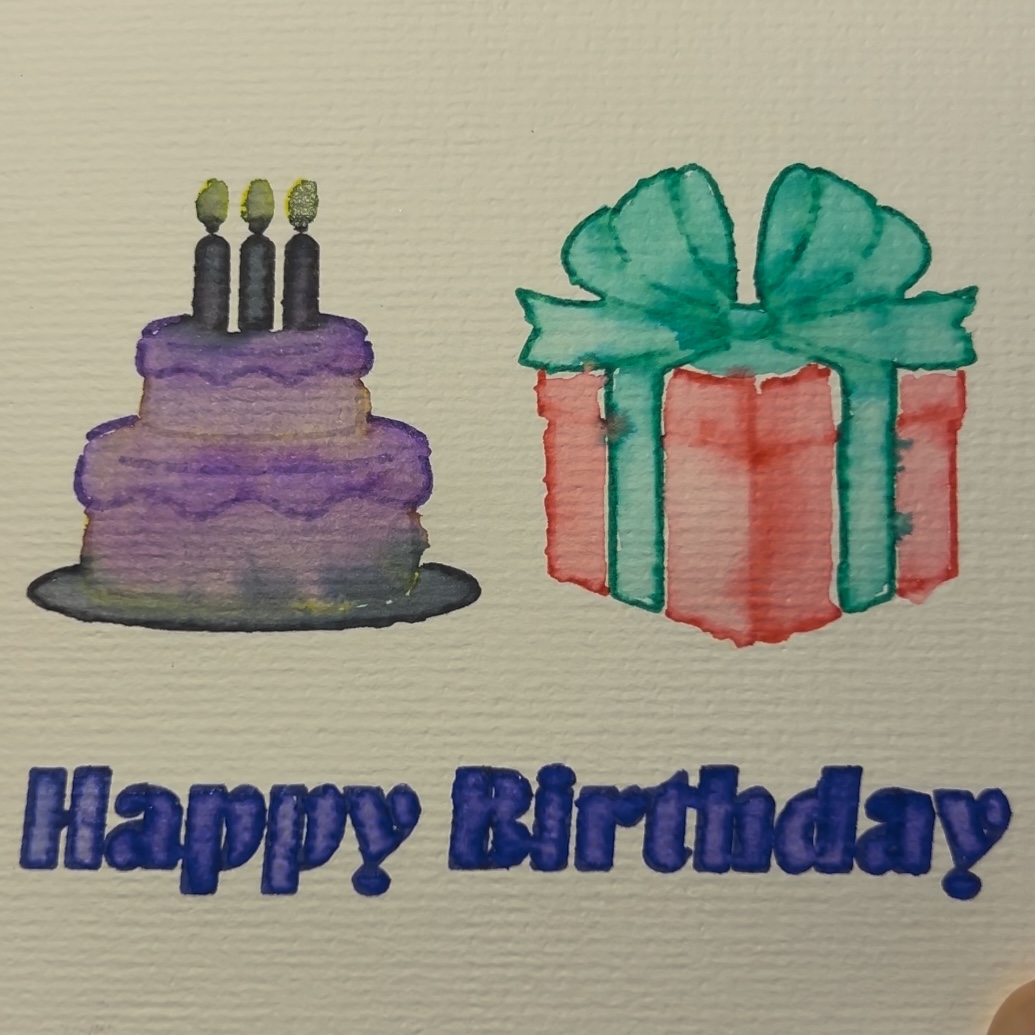
  • How to Make a Watercolor Birthday Card with Cricut

    How to Make a Watercolor Birthday Card with Cricut

    Creating a beautiful watercolor birthday card with your Cricut is a fun and unique way to send a heartfelt message. With Cricut’s Watercolor Markers and the Freehand Watercolor Brush, you can achieve a stunning blend of machine precision and artistic creativity. Let’s dive into this step-by-step guide!

    Materials Needed:

    • Cricut Joy Xtra (or another Cricut machine)
    • Cricut Design Space app
    • Cricut Watercolor Markers
    • Freehand Watercolor Brush
    • Cricut Watercolor Cards (pre-folded)
    • Cricut Card Mat
    • Water container and paper towel (for cleaning the brush)
    • Optional: Weeding tool for intricate designs

    Step 1: Design Your Card

    1. Open Cricut Design Space: Start a new project and search for a birthday card design or create your own.
    2. Incorporate Watercolor Elements: Add text, shapes, or images that you want the Cricut to draw with the Watercolor Markers. Keep the design simple for the best results.
    3. Size Your Design: Adjust the design to fit your Cricut Watercolor Card dimensions. A standard size like 5×7 inches works well.
    4. Assign Marker Lines: In the Layers panel, set your design elements to “Draw” and choose “Watercolor Marker” as the tool.

    Step 2: Set Up Your Cardstock

    1. Prepare the Mat: Place the Cricut Watercolor Card on the Standard Grip mat, ensuring it’s smooth and aligned.
    2. Load the Mat: Insert the mat into your Cricut machine.

    Step 3: Draw the Design

    1. Select the Material: In Design Space, choose the material setting compatible with your Cricut Watercolor Card.
    2. Load the Watercolor Marker: Insert the desired Watercolor Marker into your Cricut’s pen holder.
    3. Start the Draw: Click “Go” in Design Space, and the Cricut will draw the design onto the card.
    4. Unload the Mat: Once completed, carefully remove the mat and card.

    Step 4: Blend with the Freehand Watercolor Brush

    1. Prepare the Brush: Dip the Freehand Watercolor Brush into clean water and blot off excess moisture on a paper towel.
    2. Blend the Colors: Gently run the brush over the drawn lines to activate and blend the watercolor ink. Work in small sections for better control.
    3. Layer Colors (Optional): Add depth by layering additional colors with the markers and blending them again.

    Step 5: Add the Finishing Touches

    1. Add a Message: Write your personal message inside the card using a pen or marker.
    2. Embellish (Optional): Add extra decorations like stickers, glitter, or ribbon for a more festive look.

    Step 6: Present Your Card

    Your watercolor birthday card is now complete! Pair it with an envelope and give it to your loved one to brighten their special day.

    Tips for Success

    • Use light, even pressure when blending with the brush to avoid tearing the cardstock.
    • Test your markers on a scrap piece of watercolor paper before starting.
    • Clean the brush between colors to prevent muddy blends.

    This project is a perfect way to combine technology and artistry for a truly unique creation. Happy crafting!
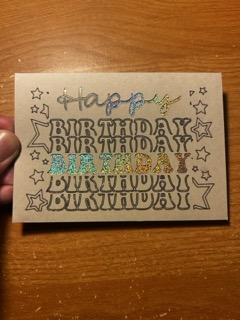
  • How to Make a Happy Birthday Cutaway Card with Cricut

    How to Make a Happy Birthday Cutaway Card with Cricut

    If you’re looking to create a custom and thoughtful birthday card, a Cricut machine is your perfect crafting companion. In this step-by-step guide, we’ll walk you through the process of making a happy birthday cutaway card using your Cricut.

    Materials Needed:

    • Cricut Joy Xtra (or another Cricut machine)
    • Cricut Card Mat (specific to your machine)
    • Cutaway card kit (includes card base and adhesive backer)
    • Cricut Design Space app
    • Fine-point blade (included with most Cricut machines)
    • Weeding tool (optional)
    • Scraper tool (optional)

    Step 1: Prepare Your Design

    1. Open Cricut Design Space: Launch the app and sign in.
    2. Search for a Design: Type “Happy Birthday Cutaway Card” in the projects search bar. You can also create your own design using text and images.
    3. Select the Card Size: Choose a pre-made design that matches the size of your cutaway card base or adjust the canvas to match your card’s dimensions.
    4. Customize (Optional): Modify the design by adding names, icons, or special details. Ensure all elements fit within the card base dimensions.

    Step 2: Set Up the Card on the Mat

    1. Place the Card: Remove the adhesive liner from the back of the card base. Stick the adhesive backer onto the inside of the card base, ensuring it’s smooth and aligned.
    2. Position on the Mat: Place the prepared card onto the Cricut Card Mat, ensuring it’s properly aligned and secured.
    3. Load the Mat: Insert the card mat into your Cricut machine.

    Step 3: Cut the Design

    1. Select the Material: In Design Space, choose the material setting for “Cutaway Card” or “Cardstock.”
    2. Load the Blade: Ensure the fine-point blade is installed in your Cricut machine.
    3. Start the Cut: Press “Go” in Design Space, and the Cricut will begin cutting your design.

    Step 4: Weed the Design

    1. Remove Excess Material: Use the weeding tool to gently remove the negative spaces from the design.
    2. Inspect the Design: Ensure all intricate details are cleanly cut and free of debris.

    Step 5: Add Final Touches

    1. Decorate (Optional): Add embellishments like stickers, glitter, or hand-drawn details to personalize the card further.
    2. Write a Message: Use Cricut-compatible pens to write a heartfelt message inside, or do it by hand for a personal touch.

    Step 6: Present Your Card

    Your Happy Birthday Cutaway Card is now ready to impress! Hand it over or send it in the mail for a unique, handmade way to celebrate someone’s special day.

    Tips for Success

    • Test the design on scrap material if you’re trying something new.
    • Ensure your fine-point blade is sharp for clean cuts.
    • Keep your Cricut Card Mat clean and free of debris for better adhesion.

    Happy crafting!